
There’s a running joke in construction that the easiest way to hide information is to put it in the project documents. Everyone has the specs, everyone has the drawings, and yet somehow nobody can find what they’re looking for when they actually need it.
This isn’t a technology problem in the traditional sense. We have document management systems. We have cloud storage. We have perfectly good search functions that work exactly as designed. The issue is that construction documents don’t behave like other documents. A specification book uses different terminology than the drawings. An RFI might reference information that’s spread across four different sheets. The person asking the question doesn’t always know the exact words to search for.
Framework, a relatively new entrant to the construction technology market, claims to have built something that understands this. We spent several weeks evaluating the platform to see whether the reality matches the promise.
The Company and Its Approach
Framework positions itself specifically for construction—not as a general-purpose AI tool that happens to work with PDFs, but as a purpose-built solution for how our industry actually operates. The founder, from what we understand, spent roughly two decades in construction before building this tool, which perhaps explains why it feels different from the typical Silicon Valley approach to “disrupting” our industry.
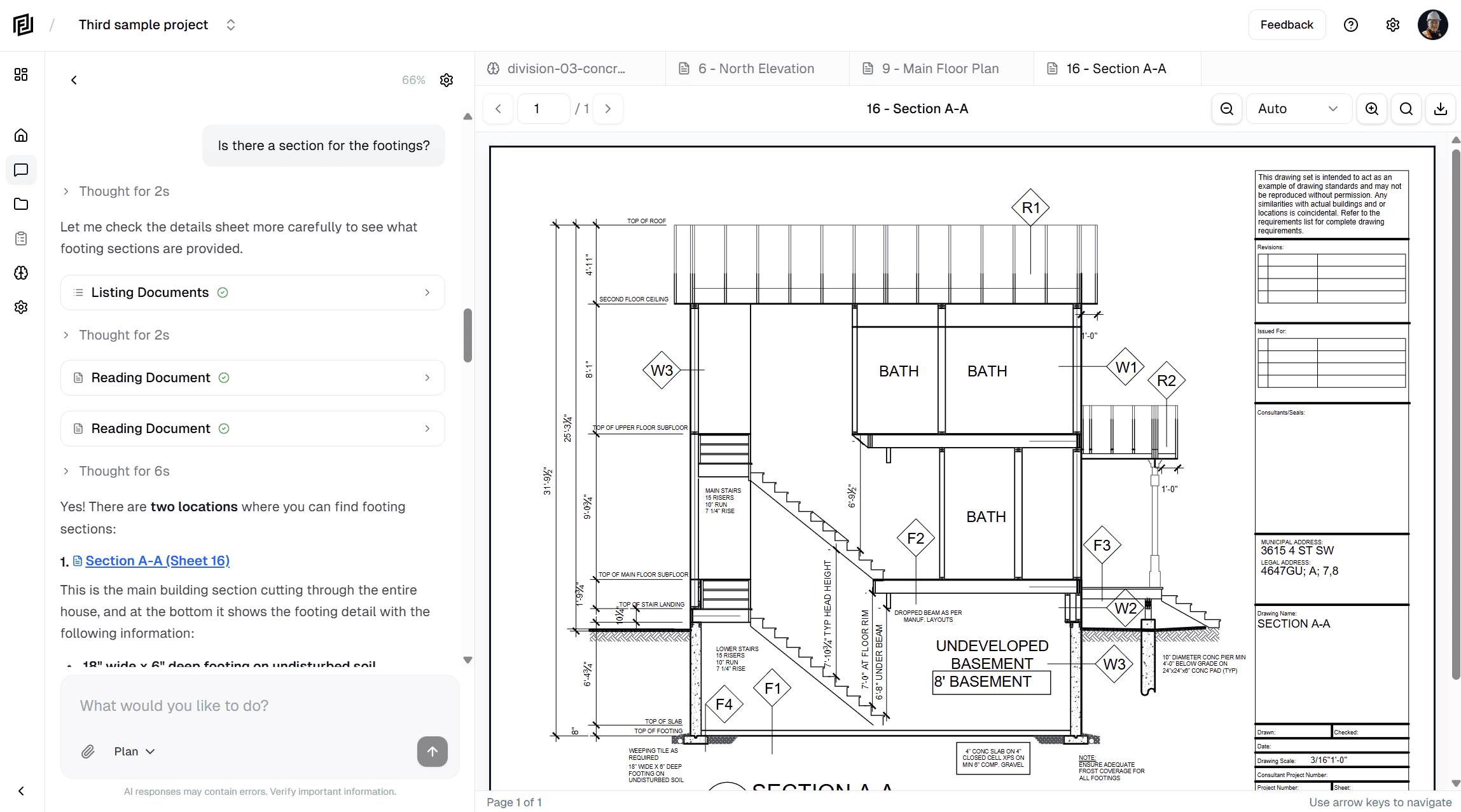
The core premise is straightforward: upload your project documents, then ask questions about them in plain language. The AI processes everything, interprets your intent, and returns answers along with citations showing exactly where the information came from.
On paper, this sounds like every other AI assistant. In practice, the construction-specific focus makes a meaningful difference.
Functional Evaluation
We tested Framework against a commercial interior fit-out project—roughly 60 architectural drawings, a 200-page specification book, two dozen RFIs, and various submittals. Not a massive project, but complex enough to represent real-world conditions.
Document Processing
Upload was straightforward. Drag files into the interface, wait for processing, and you’re ready to go. The entire document set took about 15 minutes to process, though Framework claims this varies based on document complexity and current system load. No manual tagging or organization required—the AI handles categorization automatically.
One notable observation: Framework maintained the original document structure and naming conventions. When it cited information, it referenced the actual drawing numbers and specification sections rather than some internal identifier. This matters when you need to communicate findings to team members who may not be using the platform.

Query Performance
We tested a range of queries, from simple specification lookups to more complex cross-reference questions.
Simple queries (“What type of ceiling tile is specified?”) returned accurate results in under 10 seconds, with citations to the specific specification section and relevant details like grid dimensions and edge profiles.
Complex queries (“What are all the fire-rated assemblies required for this project, and where are they located?”) took longer—closer to 30-40 seconds—but produced a comprehensive summary pulling from multiple drawings and the specification book. We manually verified the results against our own takeoff and found one minor omission, but overall accuracy was strong.
Ambiguous queries were interesting. When we asked “What’s the paint situation?” (intentionally vague), Framework asked a clarifying question about whether we meant interior or exterior, then proceeded once we specified. It didn’t just return every mention of paint in the documents—it understood we were looking for something actionable.
Cross-reference queries worked better than expected. “Does the mechanical schedule match the equipment listed in the spec?” produced a detailed comparison showing where the two aligned and where they diverged. This kind of analysis would typically require someone to manually compare documents side by side.
Citation and Verification
Every response from Framework includes citations—not just “see Drawing A-101” but specific page references and, where applicable, relevant excerpts. Clicking a citation opens the source document at the relevant location.
This isn’t a minor feature. The construction industry has significant liability concerns, and nobody should be making decisions based on AI responses they can’t verify. Framework clearly understands this. The citation system essentially makes the AI an assistant for finding information rather than an oracle pronouncing answers from on high.
We did find a few instances where the citation pointed to related but not directly relevant content. In one case, we asked about hardware specifications and the citation included a paragraph about door frames that mentioned hardware in passing. The answer was still correct—it just required reading a bit more context to confirm.
Memory and Context
Framework maintains conversation context across multiple queries, which proves more useful than it might initially sound. During our testing, we asked about the HVAC system, then followed up with “What about the controls?” without specifying we were still discussing HVAC. Framework understood the context and responded accordingly.
This mimics how people actually work—building on previous questions rather than starting fresh each time. Whether this “memory” persists between sessions or only within a single conversation wasn’t entirely clear from our testing, though the interface suggests it learns project-specific terminology over time.

Market Positioning
Framework enters a space with established players in adjacent categories but few direct competitors doing exactly what it does.
Document management platforms (Procore, PlanGrid, Bluebeam) focus on storage, distribution, and collaboration. Their search capabilities are functional but rely on traditional keyword matching. They’re built to organize documents, not to understand them.
General AI assistants (ChatGPT, Claude, etc.) can process PDFs and answer questions, but lack construction-specific training. They’ll misinterpret industry terminology, miss context that’s obvious to construction professionals, and can’t handle the multi-document cross-referencing that our industry requires.
Construction-specific AI is a growing category, but most entrants focus on different problems—generative design, scheduling optimization, safety monitoring. Framework is one of the few we’ve seen focused purely on document intelligence.
This positioning creates both opportunity and risk. There’s clearly market need for what Framework does—anyone who’s spent an afternoon hunting for a specification detail understands the problem. But being early to a category means educating the market and weathering the inevitable skepticism that accompanies any AI tool.
Pricing Analysis
Framework uses a token-based pricing model, which is standard for AI services but unfamiliar to most construction professionals. Three tiers are available:
- Starter ($29/month): 1 project, 1M tokens
- Plus ($49/month): 3 projects, 2.5M tokens
- Pro ($99/month): 10 projects, 5M tokens
All plans include unlimited document uploads, which is notable—there’s no per-document or storage-based fee.
The token allocation is harder to evaluate without extended use. Framework’s documentation suggests 1M tokens supports roughly 500-700 questions depending on document complexity, but actual usage would depend heavily on project characteristics and query patterns.
For context: if a project manager spends 2 hours per week searching for document information (a conservative estimate for many roles), that’s roughly 100 hours annually. At even modest billing rates, recovering that time would justify several times the cost of the Pro plan.
The counterargument is that Framework doesn’t eliminate document research entirely—it accelerates it. A 75% time reduction is meaningful, but it’s still time. Whether the subscription cost delivers positive ROI depends on how much time your team currently spends on this problem and what that time is worth.
Limitations and Considerations
No tool is without constraints. Several observations from our evaluation:
Document format dependency. Framework works with PDFs, which covers the majority of construction documents but excludes native CAD files, BIM models, and other formats. Teams heavily invested in model-based workflows would need to export to PDF for Framework to access that information.
Learning curve on prompting. While Framework understands natural language, there’s still an art to asking questions that get useful answers. Vague queries return vague results. Overly specific queries might miss relevant information in adjacent documents. Like any tool, there’s a learning period before you’re using it effectively.
Verification still required. Framework is explicit that it’s a search and analysis tool, not a decision-making system. The citations exist specifically so users can verify information before acting on it. This is the right approach, but it means Framework accelerates rather than replaces the research process.
Feature maturity. Some capabilities that larger organizations might expect—detailed permission controls, audit logging, integration with existing systems—appear to be in development rather than fully available. Smaller firms likely won’t notice the gaps; enterprise buyers may want to wait for additional features.
New market entrant. Framework is a young company in an industry that values stability and track record. Whether they’ll still be around in five years, whether the product will continue improving, whether support will remain responsive as they scale—these are unknowns that some organizations weigh heavily.
Who Benefits Most
Based on our evaluation, Framework delivers the most value for:
Mid-size general contractors managing multiple active projects with substantial document sets. The ability to quickly search across project documents reduces the administrative burden on project managers and enables faster response to field queries.
Development firms who need rapid answers from construction documents but may not have deep technical staff to interpret them. Framework lowers the barrier to accessing detailed project information.
Consultants and owners’ representatives who frequently review documents from projects they didn’t design or build. Coming into an unfamiliar document set and quickly finding relevant information is exactly the use case Framework is built for.
Specialty contractors working from document sets they received from others, where understanding scope and requirements quickly impacts bidding accuracy and execution efficiency.
For single-project residential contractors or firms with minimal documentation, the value proposition is less compelling. The platform scales with document complexity—the simpler your projects, the less you’ll notice the benefit.
Verdict
Framework addresses a genuine operational problem in construction: the disproportionate amount of time spent searching for information that already exists in project documents. The approach is sound, the execution is competent, and the construction-specific focus distinguishes it from generic AI alternatives.
The question for any individual firm is whether the time savings justify the subscription cost. For teams spending meaningful hours on document research—and that’s most commercial construction operations—the math likely works. For smaller or simpler operations, the calculation is less clear.
We’d recommend Framework for evaluation by any construction firm currently struggling with document accessibility. The free trial allows testing with actual project documents, which is the only way to accurately gauge whether the tool fits your workflow.
Construction technology has seen its share of overpromised solutions. Framework isn’t promising to revolutionize the industry. It’s promising to help you find information faster. That’s a modest claim, and from our evaluation, it’s one they actually deliver on.
Platform: framework.construction
Pricing: Starts at $29/month
Trial: 7 days